Medical Monitoring Vector Infographic Design Guide
Visualizing complex healthcare data requires a delicate balance between scientific accuracy and accessible design. A Medical Monitoring Vector Infographic serves as a bridge between raw clinical information and human understanding, transforming abstract patient metrics into clear, actionable visuals. Whether you are designing a hospital workflow presentation, creating educational materials for nursing students, or developing marketing content for a health-tech startup, the right vector template provides the structural foundation necessary to communicate effectively. These assets are not merely decorative; they are functional tools that organize information hierarchically, ensuring that critical data points regarding patient care, examination protocols, or diagnostic timelines are understood instantly by diverse audiences.
Defining the Asset and Its Core Utility
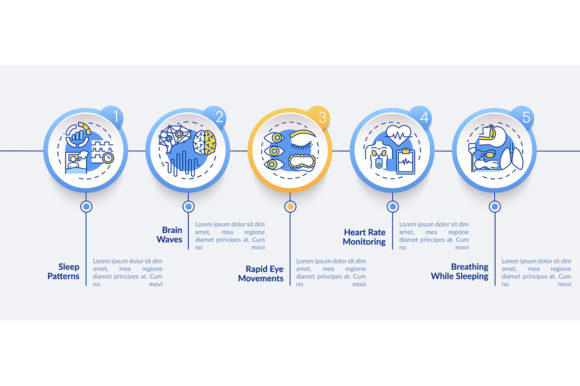
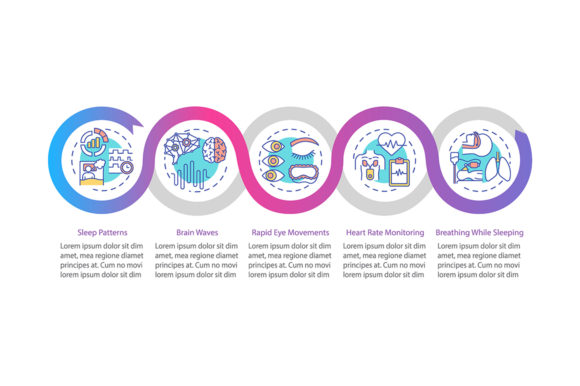
At its most fundamental level, this specific type of infographic template focuses on process and progression. Unlike static charts that display a single snapshot of data, a medical monitoring vector layout typically illustrates a journey. This often manifests as a five-step process timeline or a linear workflow chart populated with industry-specific icons. The "vector" aspect is crucial here. Because these files are mathematically defined rather than pixel-based, they allow for infinite scaling without quality loss. A designer can resize a heart rate monitor icon from a business card size to a billboard size while maintaining crisp edges.
The inclusion of multiple file formats—EPS, AI, SVG, PNG, and JPG—in a standard ZIP package addresses the varied technical realities of modern users. While professional designers rely on AI and EPS files for deep customization in Adobe Illustrator, marketers or educators might prefer ready-to-use PNG or SVG files for quick insertion into PowerPoint, Canva, or web platforms. This versatility ensures the asset remains useful regardless of the user's software ecosystem or technical proficiency.
Perspectives Across Different User Groups
The value of a healthcare examination presentation design element shifts dramatically depending on who is using it and why. There is no single "correct" way to evaluate these templates; rather, relevance is determined by specific project goals and skill levels.
For Healthcare Professionals and Educators
Clinicians and medical instructors prioritize accuracy and clarity over stylistic flair. When a nurse educator creates training materials on post-operative monitoring, the primary concern is whether the five-step timeline accurately reflects current medical protocols. For this group, the linear icons must be anatomically and procedurally correct. A stylized stethoscope is acceptable, but an incorrect representation of an ECG lead placement could undermine the educational value. These users evaluate templates based on their adherence to medical standards and their ability to reduce cognitive load for learners. They need visuals that support evidence-based practice, not distract from it.
For Marketers and Health-Tech Entrepreneurs
In contrast, professionals in the commercial health sector often focus on engagement and brand alignment. A marketer promoting a new remote patient monitoring app needs a Medical Monitoring Vector Infographic that looks modern, trustworthy, and clean. Their priority is flexibility. Can the color palette be adjusted to match corporate branding? Are the icons generic enough to represent various services, or specific enough to highlight unique selling propositions? For entrepreneurs, speed is also a critical factor. They may not have the budget for custom illustration, so a high-quality template that can be customized in under an hour represents significant commercial value. They are evaluating the asset as a time-saving mechanism that still delivers professional polish.
For Beginners, Students, and Hobbyists
Those new to design or healthcare communication often face a steep learning curve. For a student creating a capstone project or a freelancer building a portfolio, these templates serve as educational scaffolding. By deconstructing a professionally designed workflow layout, beginners learn how to space elements, align text with icons, and create visual hierarchy. The availability of editable AI and EPS files allows them to experiment safely. They might not need the commercial license or the hyper-specific medical accuracy required by clinicians; instead, they value the learning opportunity and the confidence boost of producing a polished final product. Ease of use and documentation become the deciding factors for this demographic.
Evaluating Quality and Practical Application
Selecting the right template involves more than just aesthetic preference. It requires a practical assessment of how the asset will function within a specific workflow. When reviewing a Medical Monitoring Vector Infographic, consider the following dimensions of utility.
Structural Flexibility vs. Rigidity
Some templates are highly modular, allowing users to add or remove steps from the five-step process easily. Others are more rigid, designed specifically for a fixed sequence. If your project involves a seven-stage patient intake procedure, a rigid five-step template might require awkward workarounds. Always check if the timeline chart uses smart objects or grouped layers that facilitate expansion. True utility comes from adaptability; a template should accommodate your data, not force your data to fit the template.
Iconography and Semantic Clarity
Icons act as visual shorthand, but their effectiveness depends on context. In a general wellness blog, soft, rounded icons may convey approachability. In a surgical monitoring protocol, sharper, more technical line art may convey precision. Evaluate whether the included linear icons match the tone of your content. Furthermore, ensure the icons are semantically distinct. If the icon for "blood pressure monitoring" looks too similar to "heart rate monitoring," the infographic fails its primary purpose of rapid comprehension. Distinctiveness is key to effective data visualization.
File Format Compatibility and Workflow Integration
The ZIP file contents dictate where and how you can use the asset. SVG files are increasingly important for web-based health portals and responsive presentations because they scale perfectly on mobile devices and remain accessible to screen readers when tagged correctly. EPS and AI files are essential for print materials like hospital posters or academic journals. JPG and PNG serve as universal fallbacks for quick sharing or legacy software. Before downloading or purchasing, verify that your current software stack supports the provided formats. A beautiful AI file is useless to a user who only has access to basic office suite software, just as a flat JPG is limiting for a designer needing to change background colors.
Making the Right Choice for Your Needs
Ultimately, the decision to use a pre-made Medical Monitoring Vector Infographic should be driven by resource allocation. Ask yourself what you are trying to achieve and what constraints you face.
- If speed is paramount: Focus on templates with pre-set color schemes and PNG/SVG exports. Look for layouts where text placeholders are clearly labeled, allowing for rapid content swapping without navigating complex layer structures.
- If customization is required: Prioritize AI and EPS files with organized layer groups. Check if the vector paths are closed and clean, which makes recoloring and reshaping significantly easier. Avoid templates with excessive raster effects that cannot be edited as vectors.
- If accuracy is non-negotiable: Scrutinize the preview images for medical correctness. Read descriptions to see if the designer consulted healthcare professionals or if the asset is marketed purely as a generic design element. You may need to replace generic icons with verified medical symbols to meet compliance or educational standards.
- If budget is tight: Consider the long-term value. A slightly more expensive template that includes five different workflow variations and full source files offers better ROI than a cheaper, single-use graphic. Think about whether the linear icons included can be repurposed for future projects beyond the immediate infographic.
Data visualization in healthcare is a responsibility as much as it is a design challenge. The goal is always to enhance understanding, whether that means helping a doctor spot a trend faster, helping a student grasp a concept deeper, or helping a patient feel more informed about their care pathway. By carefully evaluating Medical Monitoring Vector Infographic templates through the lens of your specific audience and operational needs, you transform a simple digital asset into a powerful communication tool. The best template is not necessarily the most elaborate one, but the one that most effectively aligns with your intent, respects your workflow, and serves the people who will ultimately view your work.