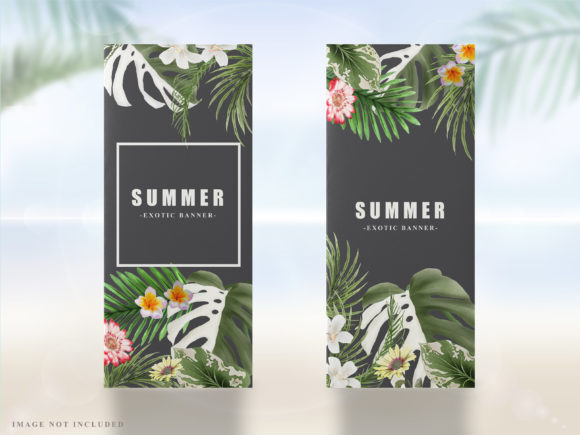
Tropical Leaves Summer Banner: Editable Event Design
Creating a cohesive visual identity for summer events often requires balancing vibrant aesthetics with professional clarity. The Tropical Leaves Summer Banner serves as a foundational design element for weddings, birthday parties, and seasonal promotions, offering a lush, organic backdrop that immediately communicates a relaxed yet celebratory atmosphere. Rather than spending hours sourcing individual stock photos or attempting to draw complex foliage from scratch, this template provides a pre-arranged composition that maintains visual harmony. For event planners, marketers, and individuals hosting gatherings, the primary value lies in the immediate availability of a high-quality aesthetic that can be adapted to specific needs without compromising on resolution or style.
Leveraging Vector Formats for Unlimited Scaling
The technical specification of this banner is perhaps its most significant practical advantage. Provided in Adobe Illustrator (AI) and EPS formats, the design is vector-based rather than raster-based. This distinction is critical for anyone producing physical signage or large-format digital displays. Unlike JPEG or PNG files, which lose quality and become pixelated when enlarged, vector graphics rely on mathematical paths. This means you can resize the Tropical Leaves Summer Banner to fit a standard 5x7 inch invitation or a massive 4x8 foot welcome sign at a venue entrance without any degradation in sharpness.
For small business owners creating promotional materials for a summer sale, this scalability ensures brand consistency across different touchpoints. You might use a cropped version of the banner for an Instagram story, a wider aspect ratio for a website header, and a vertical orientation for a printed poster. Having a single source file that accommodates all these variations eliminates the need to purchase multiple assets or hire a designer to recreate the layout for different dimensions. It streamlines the production workflow and reduces the margin for error when coordinating print and digital campaigns.
Streamlining Customization for Non-Designers
While the file requires Adobe Illustrator, the template is structured to be accessible to users with varying levels of design proficiency. The "easy to use and edit" description implies a layered organization where text, background elements, and decorative foliage are separated. This allows for non-destructive editing. A wedding coordinator, for example, can swap out placeholder text for the couple’s names and date without accidentally shifting the leaf arrangement. Similarly, a party planner can adjust the color palette of the leaves to match specific floral arrangements or table linens by simply modifying fill colors within the software.
This level of editability supports rapid iteration. If a client decides to change the event theme from "tropical jungle" to "soft garden party" two weeks before the date, the banner can be adjusted quickly. The ability to manipulate the artwork directly empowers users to maintain creative control rather than relying on back-and-forth communication with a third-party vendor. For freelancers managing multiple clients, this efficiency translates to better time management and the ability to deliver polished results under tight deadlines.
Typography Considerations and Visual Hierarchy
The template utilizes Times New Roman and Impact, two fonts that serve distinct functional purposes within the design hierarchy. Understanding how to leverage these typefaces is key to maximizing the banner's effectiveness. Impact is a bold, condensed sans-serif font that commands attention. It is ideally suited for headlines, dates, or short phrases like "Summer Sale" or "Welcome." Its heavy weight ensures legibility even against busy foliage backgrounds or from a distance at an outdoor venue.
Conversely, Times New Roman offers a classic serif aesthetic that introduces elegance and readability for longer text blocks. In the context of a wedding banner, this font works well for formal details such as venue locations, dress codes, or heartfelt quotes. The contrast between the modern boldness of Impact and the traditional refinement of Times New Roman creates a dynamic visual tension that keeps the design engaging. However, users should note that while these fonts are standard, substituting them with licensed commercial fonts may be necessary for certain branding guidelines. Always verify font licensing if you plan to use the banner for high-volume commercial merchandise.
Practical Applications Across Different Sectors
The versatility of the Tropical Leaves Summer Banner extends beyond personal celebrations. Educators and school administrators can utilize the design for end-of-year awards ceremonies, summer reading program announcements, or graduation decorations. The tropical motif aligns naturally with summer programming while remaining neutral enough to suit institutional environments. By editing the text and adjusting the color saturation, the same asset can transition from a festive party decoration to a professional educational display.
Content creators and bloggers also benefit from this asset as a recurring visual anchor. Using a consistent banner style across blog posts, YouTube thumbnails, and social media headers during the summer months helps build seasonal brand recognition. Because the file is editable, creators can generate dozens of unique variations—changing only the headline text—while maintaining a unified look. This approach saves significant time compared to designing new graphics for every piece of content, allowing more focus on writing and engagement.
Evaluating Fit and Technical Requirements
While this template offers substantial benefits, it is important to assess whether it fits your current technical ecosystem and project scope. The requirement for Adobe Illustrator AI and EPS files means this product is not suitable for users who only have access to basic photo editors or word processing software. If you do not own or subscribe to Adobe Illustrator, you will need to factor in the cost of the software or find a local print shop that accepts EPS files for direct printing. Alternatively, free open-source vector editors like Inkscape can sometimes open AI/EPS files, though layer compatibility is not always guaranteed.
Additionally, consider the stylistic alignment with your event. Tropical leaves imply a specific mood: vibrant, organic, and informal. If your wedding is strictly black-tie minimalist or your corporate event requires conservative branding, this aesthetic may require significant modification to feel appropriate. In such cases, compare this option against more geometric or abstract templates. The goal is to select a design that enhances your message rather than distracting from it. For those committed to the tropical theme, however, the depth and detail of this vector art provide a richness that flat clipart cannot achieve.
Maximizing Value Through Strategic Editing
To get the most out of this purchase, approach the file as a modular kit rather than a static image. Experiment with isolating individual leaf elements to create borders, corner accents, or watermark overlays for other documents. The vector nature of the file allows you to extract components and repurpose them across your entire event stationery suite, from menus to thank-you cards. This maximizes the return on investment by turning a single banner purchase into a comprehensive design system.
Furthermore, take advantage of the included support. The creator explicitly invites messages and comments regarding questions or concerns. If you encounter technical issues with layers or need advice on color matching for print, reaching out can prevent costly mistakes. Professional designers understand that templates are starting points, and utilizing available support ensures your final output meets professional standards. Whether you are a seasoned marketer refreshing a seasonal campaign or a first-time bride designing your own stationery, the Tropical Leaves Summer Banner provides a reliable, scalable foundation for bringing summer visions to life with efficiency and style.