Digital Inclusion Preconditions: A Visual Guide
Bridging the digital divide requires more than just good intentions; it demands a structured approach to understanding the foundational elements that allow communities to participate fully in the digital economy. When we talk about digital inclusion preconditions, we are referring to the essential building blocks that must exist before true equity can be achieved. These are not merely abstract policy concepts but tangible requirements involving infrastructure, affordability, digital literacy, and accessible content. For professionals, educators, and community leaders, communicating these complex dependencies effectively is often as challenging as implementing them. This is where high-quality visual assets become indispensable tools for advocacy and education.
Understanding these preconditions is the first step toward creating actionable strategies. However, translating technical requirements into a narrative that resonates with stakeholders, investors, or students requires clarity. A well-designed vector infographic template serves as a bridge between raw data and human understanding. By utilizing design elements specifically crafted for digitalization presentations, you can transform a dense list of prerequisites into an engaging story of progress and opportunity. The goal is to move beyond static text and create a visual workflow that guides the audience through the necessary stages of development, ensuring that no critical foundation is overlooked.
Visualizing the Three Pillars of Access
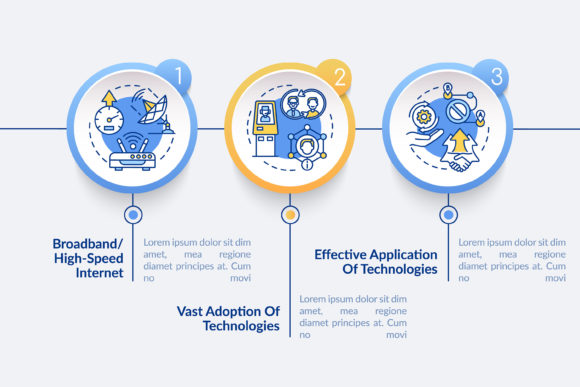
The most effective way to explain digital inclusion preconditions is through simplified data visualization. Complex systemic issues are best understood when broken down into manageable components. A three-step process timeline chart is particularly effective here because it mirrors the logical progression of development. Instead of presenting a chaotic web of factors, this layout organizes information into a linear narrative that suggests movement and solution-oriented thinking. For a marketer or nonprofit director, this structure helps frame the conversation around growth rather than deficit.
- Step One: Infrastructure and Connectivity. The foundation always begins with physical access. In your visualization, this stage should highlight broadband availability, network reliability, and hardware distribution. Using linear icons to represent cell towers, fiber optics, or devices creates an immediate visual association with tangible assets.
- Step Two: Affordability and Adoption. Access means nothing if it is out of reach. The second phase of your timeline should focus on economic barriers, subsidy programs, and device ownership costs. This is where the human element enters the data visualization, reminding viewers that technology must be economically viable for widespread adoption.
- Step Three: Digital Literacy and Relevant Content. The final precondition is the ability to use the technology meaningfully. This step encompasses training programs, language accessibility, and culturally relevant applications. Visually representing this might involve icons of people, books, or community networks, signaling that the ultimate goal is human empowerment.
By adhering to this three-step framework, presenters can ensure their audience grasps the sequential nature of these preconditions. You cannot have literacy without access, and you cannot have sustainable adoption without affordability. The visual hierarchy reinforces this dependency, making the argument for comprehensive funding or policy support much more persuasive.
Practical Applications Across Sectors
The versatility of a digital inclusion preconditions vector infographic template extends far beyond government reports. Entrepreneurs and small business owners can use these visuals to demonstrate market readiness in underserved areas. When pitching a new service to investors, showing a clear grasp of the local preconditions demonstrates due diligence and social responsibility. It shifts the narrative from "charity" to "market development," illustrating how addressing these foundations unlocks new customer bases and economic activity.
Educators and trainers also benefit immensely from these design elements. Teaching digital citizenship or public policy can be dry if reliant solely on textbooks. A colorful, clean workflow layout with linear icons captures attention and aids memory retention. Students can better understand the interplay between different variables when they see them mapped out spatially. Furthermore, freelancers and consultants working in the tech-for-good space can use these templates to standardize their deliverables, saving time while maintaining a professional aesthetic that builds trust with clients.
For bloggers and content creators, these visuals serve as excellent featured images or inline graphics that break up long-form text. Search engines and readers alike favor content that integrates relevant imagery. When you illustrate a point about broadband gaps with a custom graphic derived from a professional template, you signal expertise and effort. This enhances the perceived value of your content and encourages social sharing, which is crucial for raising awareness about digital equity issues.
Choosing the Right File Format for Your Needs
One of the most practical considerations when selecting a digitalization presentation asset is file compatibility. Professional templates typically come in a bundle including JPG, EPS, PNG, SVG, and AI formats. Understanding when to use each is vital for maintaining quality across different mediums. Beginners often default to JPG, but knowing the difference ensures your message remains crisp whether it is viewed on a smartphone or projected onto a conference hall screen.
- SVG and EPS for Scalability. These vector formats are the gold standard for infographics. Because they are mathematically defined rather than pixel-based, they can be resized infinitely without losing quality. Use these when designing large banners, billboards, or responsive web elements where dimensions may vary.
- AI for Deep Customization. If you need to fundamentally alter the workflow layout or change the color palette to match strict brand guidelines, the Adobe Illustrator (AI) file is essential. This allows you to edit individual nodes, swap linear icons, and adjust typography with precision.
- PNG for Digital Transparency. When overlaying the three-step chart onto a colored background or a photograph in a slide deck, PNG is superior to JPG because it supports transparent backgrounds. This prevents unsightly white boxes around your graphics and creates a seamless integration with your presentation design.
- JPG for Quick Sharing. While less flexible, JPG files are universally compatible and have smaller file sizes. They are ideal for email newsletters, social media posts, or quick drafts where editing is not required.
Design Considerations for Maximum Impact
Before downloading or purchasing a template, consider the specific tone of your project. Digital inclusion is a serious topic, but the design should not feel oppressive. Look for templates that balance professionalism with warmth. Linear icons are generally preferred over skeuomorphic or overly cartoonish styles because they convey modernity and efficiency without distracting from the data. The color palette matters significantly; blue and green tones often suggest stability and growth, while high-contrast combinations ensure accessibility for visually impaired audiences—a meta-consideration that aligns perfectly with the subject matter.
Additionally, evaluate the flexibility of the three-step structure. While the preconditions generally follow a logical order, your specific context might require emphasizing one stage over another. A good template allows you to resize sections or reorder elements without breaking the overall composition. If you are focusing heavily on digital literacy programs, you should be able to expand that section of the timeline visually to reflect its importance in your narrative. Rigidity in design can lead to misrepresentation of data, so prioritize adaptability.
Finally, remember that the template is a starting point, not a finished product. The true value lies in how you populate it with accurate, localized data. A beautiful chart with generic placeholders fails to inspire action. Take the time to research the specific preconditions relevant to your target community or industry sector. When the visual elegance of a professional vector infographic meets the weight of verified facts, you create a powerful catalyst for change. Whether you are securing grant funding, teaching a class, or launching a community initiative, these design elements provide the structural integrity needed to make your vision of digital inclusion clear, compelling, and achievable.